

The MySQL “Too many connections” error means the database server has reached its configured connection limit.
When this happens, new database connections are rejected. Websites and applications that depend on MySQL may start showing errors, timing out, or becoming extremely slow.
For PHP-based websites, this can also lead to secondary problems such as:
- Nginx 502 Bad Gateway errors
- PHP-FPM worker exhaustion
- slow WordPress admin pages
- failed checkout or login requests
- intermittent database connection errors
- high server load
- application timeouts
A “Too many connections” error is not always solved by increasing max_connections. Sometimes the real problem is slow queries, sleeping sessions, poor connection handling, overloaded PHP workers, insufficient memory, or an application creating more connections than expected.
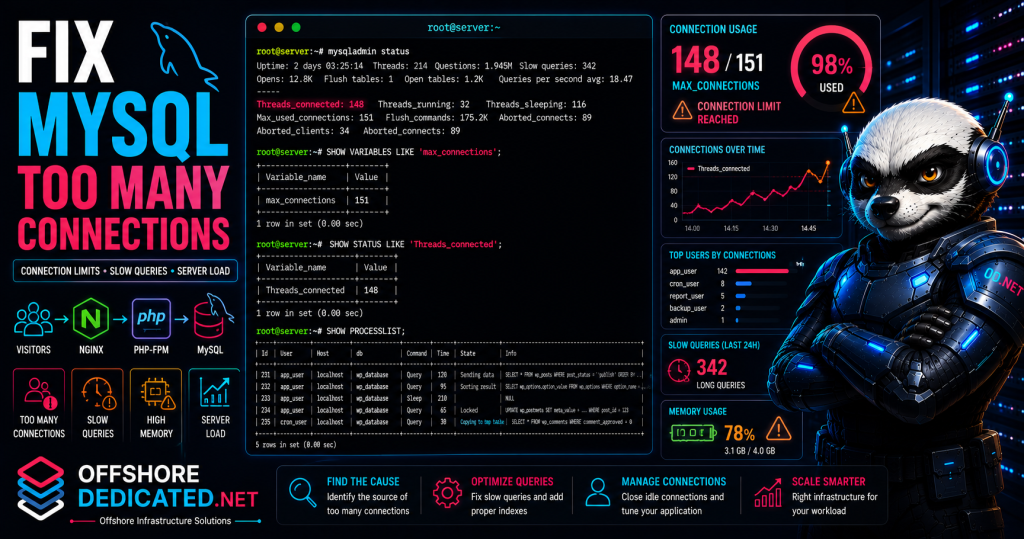
This guide explains how to troubleshoot MySQL Too Many Connections errors in Linux using MySQL status commands, process lists, error logs, PHP-FPM checks, memory diagnostics, and safe configuration changes.
What Does MySQL Too Many Connections Mean?
MySQL allows only a certain number of client connections at the same time.
This limit is controlled by the max_connections variable.
When the number of active connections reaches this limit, new connection attempts may fail with an error such as:
ERROR 1040 (HY000): Too many connectionsWeb applications may show messages like:
Error establishing a database connectionor:
Too many connectionsor a generic 500, 502, or timeout error depending on the application stack.
The important point is this:
A connection limit is the visible failure. It may not be the original cause.
The server may reach the connection limit because:
- traffic increased
- queries became slow
- PHP workers created too many database sessions
- connections were not closed properly
- sleeping connections accumulated
- the application lacks connection pooling
- database performance degraded
- the server is under memory pressure
- bots or abusive requests triggered too many dynamic pages
The correct fix depends on why connections are accumulating.
Common Causes of Too Many Connections
Common causes include:
- low
max_connectionssetting - traffic spikes
- slow database queries
- long-running transactions
- too many sleeping sessions
- application connection leaks
- overloaded WordPress plugins
- high PHP-FPM worker count
- no caching
- database lock contention
- insufficient RAM
- MySQL server overload
- cron jobs opening many connections
- bots hitting dynamic pages
- multiple websites sharing one database server
For example, if queries are slow, each connection remains open longer. As more users arrive, connections accumulate until MySQL refuses new ones.
A simplified sequence may look like this:
Slow query
    ↓
Connection remains open longer
    ↓
More PHP requests wait
    ↓
Threads_connected increases
    ↓
max_connections is reached
    ↓
New visitors see database errors
In a PHP/Nginx stack, the problem may also appear as an Nginx or PHP-FPM issue. See our guides on troubleshooting PHP-FPM in Linux and fixing Nginx 502 Bad Gateway errors for related workflows.
Check MySQL Service Status
Start by checking whether MySQL or MariaDB is running.
For MySQL:
sudo systemctl status mysql --no-pager -lFor MariaDB:
sudo systemctl status mariadb --no-pager -lA healthy service should show:
Active: active (running)If the service is failed, inspect its logs:
sudo journalctl -u mysql --since "30 minutes ago"or:
sudo journalctl -u mariadb --since "30 minutes ago"If the service is running but applications still report Too Many Connections, log into MySQL and inspect connection usage.
You can test basic availability with:
mysqladmin pingIf authentication is required:
mysqladmin -u root -p pingIf MySQL refuses even administrative access because the connection limit is reached, one reserved administrative connection may still be available to users with the proper privileges. If not, you may need to temporarily stop the application traffic or restart MySQL after collecting evidence.
For systemd-level service troubleshooting, see how to find why a systemd service failed in Linux.
Check Current MySQL Connection Limits
Log into MySQL:
mysql -u root -pCheck the configured connection limit:
SHOW VARIABLES LIKE 'max_connections';Example output:
+-----------------+-------+
| Variable_name   | Value |
+-----------------+-------+
| max_connections | 151   |
+-----------------+-------+
Check current connection usage:
SHOW STATUS LIKE 'Threads_connected';Example:
+-------------------+-------+
| Variable_name     | Value |
+-------------------+-------+
| Threads_connected | 148   |
+-------------------+-------+
Check the highest number of simultaneous connections since startup:
SHOW STATUS LIKE 'Max_used_connections';If Max_used_connections is close to max_connections, the server has reached or nearly reached its configured limit.
Check how many connection attempts failed:
SHOW GLOBAL STATUS LIKE 'Connection_errors_max_connections';This helps confirm whether MySQL has been rejecting clients because of the limit.
You can also check status from the shell:
mysqladmin statusThe output may include useful information such as uptime, threads, questions, slow queries, and open tables.
Check Active and Sleeping Connections
To see active MySQL sessions, run:
SHOW PROCESSLIST;For complete query text, use:
SHOW FULL PROCESSLIST;Important columns include:
Id
User
Host
db
Command
Time
State
Info
The Command column may show values such as:
Sleep
Query
Connect
Binlog Dump
Sleeping connections are not always bad. Applications often keep idle database connections briefly.
However, too many long-lived sleeping connections can exhaust the connection limit.
Look for:
- many
Sleepsessions with highTime - many active queries stuck for a long time
- repeated connections from one application host
- one database user consuming most connections
- queries waiting on locks
- application requests piling up
To count current sessions by command type:
SELECT COMMAND, COUNT(*)
FROM INFORMATION_SCHEMA.PROCESSLIST
GROUP BY COMMAND;
To show long-running queries:
SELECT ID, USER, HOST, DB, COMMAND, TIME, STATE, INFO
FROM INFORMATION_SCHEMA.PROCESSLIST
WHERE COMMAND != 'Sleep'
ORDER BY TIME DESC
LIMIT 20;
To show long sleeping sessions:
SELECT ID, USER, HOST, DB, COMMAND, TIME
FROM INFORMATION_SCHEMA.PROCESSLIST
WHERE COMMAND = 'Sleep'
ORDER BY TIME DESC
LIMIT 20;
This helps determine whether the issue is active query load or idle connection buildup.
Find Which Users or Hosts Use the Most Connections
To group connections by database user:
SELECT USER, COUNT(*) AS connections
FROM INFORMATION_SCHEMA.PROCESSLIST
GROUP BY USER
ORDER BY connections DESC;
To group by host:
SELECT HOST, COUNT(*) AS connections
FROM INFORMATION_SCHEMA.PROCESSLIST
GROUP BY HOST
ORDER BY connections DESC;
To group by user and host:
SELECT USER, HOST, COUNT(*) AS connections
FROM INFORMATION_SCHEMA.PROCESSLIST
GROUP BY USER, HOST
ORDER BY connections DESC;
This can reveal whether one website, one application server, one user, or one host is consuming most connections.
For example:
app_user    localhost        142
backup_user localhost          3
admin       127.0.0.1          1
If one application user owns nearly all connections, investigate that application first.
Possible causes include:
- traffic spike
- plugin issue
- database connection leak
- long-running requests
- bad cron job
- slow queries
- insufficient caching
- too many PHP-FPM workers
If the connections come from remote hosts, check whether multiple application servers are opening too many sessions or whether unwanted clients are connecting.
Check MySQL Error Logs
MySQL error logs can reveal connection limit errors, crashes, startup problems, memory allocation issues, and storage-related problems.
Common paths include:
/var/log/mysql/error.log
/var/log/mysqld.log
/var/log/mariadb/mariadb.log
Check recent MySQL errors:
sudo tail -n 100 /var/log/mysql/error.logFor MariaDB:
sudo tail -n 100 /var/log/mariadb/mariadb.logSearch for connection-related messages:
sudo grep -Ei "too many connections|aborted connection|max_connections|error" \
/var/log/mysql/error.log
You can also ask MySQL where the error log is configured:
SHOW VARIABLES LIKE 'log_error';If the result is empty or points to a different location, check your distribution and service configuration.
For broader log reading commands, see how to read Linux logs in /var/log.
For service journal logs:
sudo journalctl -u mysql --since "1 hour ago"or:
sudo journalctl -u mariadb --since "1 hour ago"For more journal usage examples, see how to use journalctl in Linux.
Check Application and PHP-FPM Behavior
In many web stacks, MySQL connection problems are closely linked to PHP-FPM behavior.
If PHP-FPM allows too many workers, each worker may open one or more MySQL connections. Under traffic, this can quickly consume the MySQL connection limit.
Check PHP-FPM worker settings:
sudo grep -R "^pm.max_children" /etc/php/*/fpm/pool.d/ /etc/php-fpm.d/ 2>/dev/nullCheck PHP-FPM status:
sudo systemctl status php8.3-fpm --no-pager -lCheck PHP-FPM logs:
sudo journalctl -u php8.3-fpm --since "1 hour ago"Search for worker exhaustion:
sudo journalctl -u php8.3-fpm --since "1 hour ago" |
grep -i "max_children"
If PHP-FPM reaches pm.max_children, requests may queue or fail. If MySQL is already saturated, PHP requests may remain open longer, holding workers and connections.
This can create a chain reaction:
Slow MySQL queries
    ↓
PHP requests stay open longer
    ↓
PHP-FPM workers become busy
    ↓
More MySQL connections accumulate
    ↓
MySQL reaches max_connections
    ↓
Nginx may show 502 or 504 errors
For PHP-FPM-specific checks, see how to troubleshoot PHP-FPM in Linux.
Check Slow Queries and Long-Running Sessions
Too Many Connections is often caused by queries taking too long.
Show currently running queries:
SELECT ID, USER, HOST, DB, TIME, STATE, INFO
FROM INFORMATION_SCHEMA.PROCESSLIST
WHERE COMMAND = 'Query'
ORDER BY TIME DESC
LIMIT 20;
If queries are stuck for many seconds or minutes, inspect the Info and State columns.
Common states may include:
Sending data
Waiting for table metadata lock
Locked
Copying to tmp table
Sorting result
Creating sort index
Slow or blocked queries can be caused by:
- missing indexes
- inefficient joins
- large table scans
- locked tables
- long transactions
- heavy admin operations
- backup jobs
- reporting queries
- overloaded storage
- insufficient memory
Check whether the slow query log is enabled:
SHOW VARIABLES LIKE 'slow_query_log';Check its path:
SHOW VARIABLES LIKE 'slow_query_log_file';Check the long-query threshold:
SHOW VARIABLES LIKE 'long_query_time';If slow queries are the cause, increasing max_connections may hide the problem temporarily while allowing even more slow sessions to accumulate.
For server-wide performance checks, see how to investigate a slow Linux server.
Increase max_connections Safely
You can temporarily increase max_connections without restarting MySQL:
SET GLOBAL max_connections = 300;Check the new value:
SHOW VARIABLES LIKE 'max_connections';This runtime change is temporary and may reset after restart.
To make it persistent, edit the MySQL or MariaDB configuration file.
Common locations include:
/etc/mysql/mysql.conf.d/mysqld.cnf
/etc/my.cnf
/etc/my.cnf.d/server.cnf
/etc/mysql/mariadb.conf.d/50-server.cnf
Add or update under the [mysqld] section:
[mysqld]
max_connections = 300
Then restart MySQL during a controlled maintenance window:
sudo systemctl restart mysqlor:
sudo systemctl restart mariadbAfter restart, verify:
SHOW VARIABLES LIKE 'max_connections';Do not set max_connections extremely high without checking memory. Every connection can consume memory, and high connection limits can make overload worse.
Check Memory Before Increasing Connections
Increasing max_connections increases the number of clients MySQL can serve at the same time, but it may also increase memory pressure.
Check current memory:
free -mCheck swap:
swapon --showCheck top memory consumers:
ps aux --sort=-%mem | head -20Check for OOM events:
sudo dmesg -T | grep -Ei "out of memory|oom|killed process"If MySQL or PHP-FPM was killed by the kernel, increasing connection limits may make the server less stable.
You may need to reduce connection demand instead by:
- adding caching
- fixing slow queries
- lowering PHP-FPM worker count
- optimizing application code
- closing idle connections faster
- separating database and web workloads
- upgrading server resources
For deeper memory investigation, see how to diagnose memory pressure in Linux.
Practical MySQL Connection Troubleshooting Workflow
Use this sequence when MySQL reports Too Many Connections.
1. Check MySQL service status
sudo systemctl status mysql --no-pager -lor:
sudo systemctl status mariadb --no-pager -l2. Check connection limit
SHOW VARIABLES LIKE 'max_connections';3. Check current connections
SHOW STATUS LIKE 'Threads_connected';4. Check peak connection usage
SHOW STATUS LIKE 'Max_used_connections';5. View active sessions
SHOW FULL PROCESSLIST;6. Group connections by user and host
SELECT USER, HOST, COUNT(*) AS connections
FROM INFORMATION_SCHEMA.PROCESSLIST
GROUP BY USER, HOST
ORDER BY connections DESC;
7. Check long-running queries
SELECT ID, USER, HOST, DB, TIME, STATE, INFO
FROM INFORMATION_SCHEMA.PROCESSLIST
WHERE COMMAND != 'Sleep'
ORDER BY TIME DESC
LIMIT 20;
8. Check MySQL logs
sudo journalctl -u mysql --since "1 hour ago"
sudo tail -n 100 /var/log/mysql/error.log
9. Check PHP-FPM behavior
sudo systemctl status php8.3-fpm --no-pager -l
sudo journalctl -u php8.3-fpm --since "1 hour ago"
10. Check memory before increasing limits
free -m
sudo dmesg -T | grep -Ei "out of memory|oom|killed process"
11. Apply the fix
Possible fixes may include:
- increasing
max_connectionssafely - fixing slow queries
- reducing PHP-FPM workers
- enabling caching
- stopping abusive traffic
- correcting application connection handling
- upgrading resources
- separating services
12. Verify recovery
SHOW STATUS LIKE 'Threads_connected';
SHOW STATUS LIKE 'Max_used_connections';
SHOW GLOBAL STATUS LIKE 'Connection_errors_max_connections';
Then monitor application behavior and error logs.
Common Mistakes When Fixing Too Many Connections
Increasing max_connections blindly
More connections are not always better. If queries are slow or memory is limited, a higher limit can make the server less stable.
Ignoring sleeping connections
Many long-lived sleeping sessions may indicate poor application connection handling or persistent connections that are not appropriate for the workload.
Ignoring slow queries
Slow queries keep connections open longer. Fixing query performance may reduce connection pressure more effectively than raising limits.
Checking only MySQL
PHP-FPM, Nginx, cron jobs, backups, bots, and application behavior can all contribute to connection spikes.
Not checking memory
Each additional connection may consume memory. Always check available RAM before increasing limits.
Restarting MySQL repeatedly
A restart clears current connections temporarily but does not fix the reason connections accumulated.
Forgetting cron jobs
Scheduled tasks can create sudden spikes in database connections, especially during imports, reports, backups, or maintenance jobs.
When MySQL Connection Problems Need Server Management
A single Too Many Connections event may happen during a temporary traffic spike.
Recurring connection saturation usually needs a deeper server and application review.
Common recurring causes include:
- too many PHP-FPM workers
- slow queries
- inefficient WordPress plugins
- missing database indexes
- bots hitting dynamic pages
- no page caching
- insufficient MySQL memory tuning
- overloaded VPS resources
- heavy cron jobs
- multiple websites sharing one database
- traffic growth beyond server capacity
OffshoreDedicated.NET provides expert server management for Linux web hosting, VPS, cloud, and dedicated server environments.
For standard database-backed websites, offshore web hosting may be suitable when managed hosting is preferred.
For applications requiring root access and isolated resources, offshore VPS servers provide greater control.
For flexible deployment and scaling needs, offshore cloud servers can support changing workloads.
For heavy MySQL, high-traffic PHP applications, or database-intensive platforms, offshore dedicated servers provide dedicated CPU, RAM, storage, and network capacity.
For location-specific infrastructure, offshore Bulgaria dedicated servers are available.
For high-throughput deployments where predictable transfer capacity matters, offshore bandwidth commit servers may be useful.
The correct solution depends on whether the connection problem is caused by configuration, slow queries, traffic growth, application behavior, or insufficient infrastructure.
Frequently Asked Questions
What causes MySQL Too Many Connections?
It happens when current connections reach the max_connections limit. The underlying cause may be traffic spikes, slow queries, sleeping sessions, application connection leaks, PHP-FPM worker pressure, or insufficient server resources.
How do I check MySQL max_connections?
Run:
SHOW VARIABLES LIKE 'max_connections';How do I check current MySQL connections?
Run:
SHOW STATUS LIKE 'Threads_connected';How do I see active MySQL connections?
Run:
SHOW FULL PROCESSLIST;How do I find which user uses the most connections?
Run:
SELECT USER, COUNT(*) AS connections
FROM INFORMATION_SCHEMA.PROCESSLIST
GROUP BY USER
ORDER BY connections DESC;
Can I increase max_connections without restarting MySQL?
Yes, temporarily:
SET GLOBAL max_connections = 300;To make it persistent, update the MySQL configuration file and restart MySQL.
Is increasing max_connections always safe?
No. More connections can require more memory. If the server is already under memory pressure, increasing the limit can trigger instability or OOM kills.
Can PHP-FPM cause MySQL Too Many Connections?
Yes. If many PHP-FPM workers open database connections at the same time, MySQL connection usage can rise quickly.
Final Thoughts
The MySQL Too Many Connections error is a sign that the database server has reached its connection limit.
Start with:
SHOW VARIABLES LIKE 'max_connections';
SHOW STATUS LIKE 'Threads_connected';
SHOW STATUS LIKE 'Max_used_connections';
SHOW FULL PROCESSLIST;
Then check:
sudo systemctl status mysql --no-pager -l
sudo journalctl -u mysql --since "1 hour ago"
free -m
sudo dmesg -T | grep -Ei "out of memory|oom|killed process"
The correct fix may be increasing max_connections, but only after understanding why connections are accumulating.
In many cases, the better solution is to fix slow queries, reduce unnecessary PHP workers, improve caching, stop abusive traffic, tune the application, or move the workload to infrastructure that can handle the demand.