RAID is one of the most widely used storage technologies in server infrastructure. Many hosting providers advertise RAID configurations for reliability or performance, yet the underlying mechanics are often misunderstood.
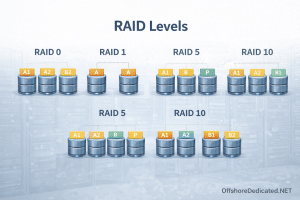
This guide explains how RAID works at a practical infrastructure level, what each RAID level actually does, and why RAID should never be confused with backups.
1. What is RAID?
RAID stands for Redundant Array of Independent Disks.
It is a technique used to combine multiple physical disks into a single logical storage system.
RAID is primarily used for two reasons:
• Performance improvements
• Data redundancy
Different RAID levels achieve these goals using different methods.
2. RAID is NOT a Backup
Before discussing RAID levels, an important clarification must be made.
RAID protects against disk failure, not against:
• accidental deletion
• malware or ransomware
• file corruption
• operating system failure
For real disaster recovery protection, RAID must be combined with proper backup architecture.
Related reading:
👉 Backups in WHM/cPanel: What Actually Gets Backed Up (and What Doesn’t)
👉 Cloud Snapshots vs Backups: What’s the Real Difference?
3. RAID 0 (Striping)
RAID 0 splits data across multiple disks.
Example with two disks:
Disk 1 → block A, C, E
Disk 2 → block B, D, F
This allows multiple disks to read and write simultaneously.
Benefits:
• High performance
• Maximum storage utilization
Drawbacks:
• No redundancy
• If one disk fails, all data is lost
RAID 0 is rarely used in production hosting environments because reliability is critical.
4. RAID 1 (Mirroring)
RAID 1 duplicates data across two disks.
Disk 1 → full copy
Disk 2 → full copy
Benefits:
• High redundancy
• Simple architecture
Drawbacks:
• Only 50% storage efficiency
RAID 1 is commonly used for:
• operating system drives
• small server deployments
5. RAID 5 (Parity-Based RAID)
RAID 5 uses striping with distributed parity.
Parity information allows the system to rebuild data if one disk fails.
Example with three disks:
Disk A → Data
Disk B → Data
Disk C → Parity
Parity rotates across disks.
Benefits:
• Good storage efficiency
• Redundancy against one disk failure
Drawbacks:
• Slower writes
• Risk during rebuild on large disks
Because modern disks are extremely large, RAID 5 rebuild times can be very long.
6. RAID 10 (RAID 1 + RAID 0)
RAID 10 combines mirroring and striping.
Example with four disks:
Pair 1 → mirrored
Pair 2 → mirrored
Then data is striped across the mirrored pairs.
Benefits:
• High performance
• High redundancy
• Fast rebuilds
Drawbacks:
• Requires more disks
• 50% storage efficiency
RAID 10 is one of the most common configurations used in production hosting servers.
7. Hardware RAID vs Software RAID
RAID can be implemented in two ways.
Hardware RAID
A dedicated RAID controller manages the disk array.
Advantages:
• Offloads processing from CPU
• Simplified disk management
Disadvantages:
• Controller failure risk
• Higher cost
Software RAID (Linux mdadm)
Linux can implement RAID directly using the mdadm subsystem.
Advantages:
• No specialized hardware required
• Flexible configuration
Disadvantages:
• Uses CPU resources
Many modern infrastructures rely on software RAID combined with powerful CPUs.
8. RAID in Hosting Infrastructure
Different hosting services use RAID in different ways.
Dedicated Servers
Dedicated servers commonly use RAID 1 or RAID 10 for reliability and performance.
This ensures disk redundancy while maintaining high I/O throughput.
👉 Learn more about our Dedicated infrastructure:
Streaming Dedicated Servers
Streaming environments handle extremely large media libraries and sustained disk throughput.
RAID 10 is often preferred because it offers both speed and redundancy.
👉 Streaming Dedicated server infrastructure:
VPS and Cloud Nodes
VPS nodes often rely on RAID 10 combined with SSD or NVMe storage.
This ensures consistent performance for multiple virtual machines sharing the same storage system.
9. Common RAID Misconceptions
Many server users misunderstand RAID capabilities.
Common myths include:
• RAID replaces backups
• RAID guarantees zero downtime
• RAID rebuilds are instant
In reality:
RAID improves disk-level resilience, but it is only one component of a larger infrastructure design.
Conclusion
RAID plays a critical role in server storage architecture by improving performance and protecting against disk failure.
However, RAID alone cannot protect data from many real-world risks.
A properly designed infrastructure combines:
• RAID for disk redundancy
• backups for disaster recovery
• offsite storage for long-term protection
Understanding RAID levels helps server operators choose the right configuration for reliability, performance, and scalability.