

The InnoDB buffer pool is one of the most important MySQL performance settings.
If the buffer pool is too small, MySQL may read data from disk more often, which can slow queries and increase server load. If it is too large, MySQL may consume too much memory and create pressure on PHP-FPM, Nginx, the operating system, and other services running on the same server.
Tuning the InnoDB buffer pool is not about choosing the biggest possible value. It is about matching MySQL memory usage to the server workload.
Administrators commonly tune the InnoDB buffer pool when they see:
- slow MySQL queries
- high disk I/O
- database-heavy WordPress sites
- WooCommerce performance issues
- MySQL using too much memory
- poor database cache efficiency
- high server load during database activity
- slow dashboards, reports, or admin panels
- repeated database performance issues
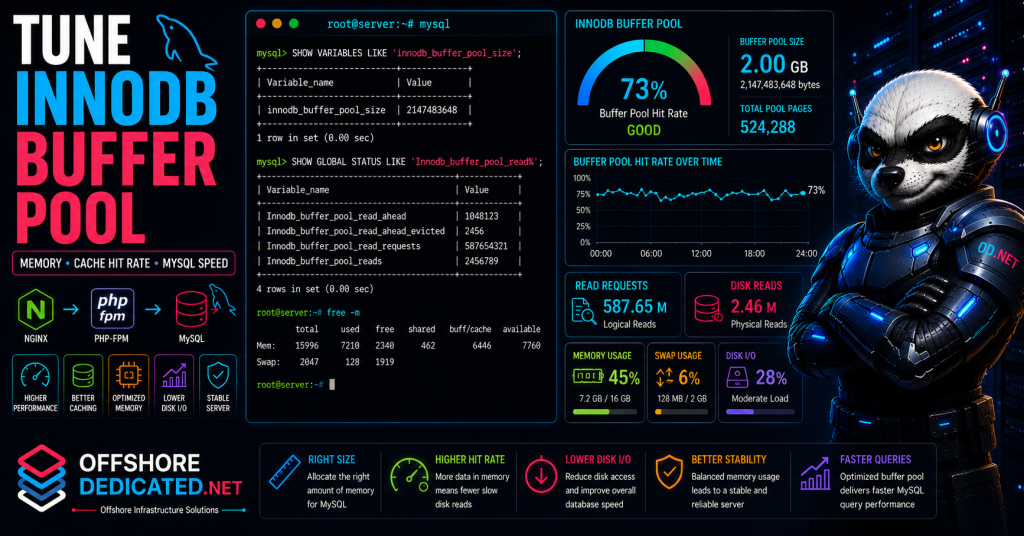
This guide explains what the InnoDB buffer pool does, how to check its current size, how to estimate a safe value, how to change it temporarily or permanently, and how to verify whether tuning improved MySQL performance.
What Is the InnoDB Buffer Pool?
The InnoDB buffer pool is a memory area used by MySQL to cache InnoDB table and index data.
Instead of reading the same data from disk repeatedly, MySQL can keep frequently used pages in memory. Since memory access is much faster than disk access, a properly sized buffer pool can significantly improve database performance.
The buffer pool stores data such as:
- table pages
- index pages
- recently accessed rows
- frequently used database pages
- modified pages waiting to be flushed to disk
Most modern MySQL and MariaDB workloads use InnoDB as the primary storage engine. That makes the buffer pool especially important for database-backed websites and applications.
A simple explanation looks like this:
Application asks MySQL for data
        ↓
MySQL checks InnoDB buffer pool
        ↓
If data is cached, MySQL reads from memory
        ↓
If data is not cached, MySQL reads from disk
The more useful data MySQL can keep in memory, the less often it needs to read from disk.
For broader database tuning, see our guide on how to optimize MySQL database performance in Linux.
Why Buffer Pool Size Matters
The buffer pool directly affects how often MySQL needs to access disk.
If the buffer pool is too small, MySQL may perform more physical disk reads. This can cause:
- slower queries
- higher disk I/O
- increased latency
- higher load average
- poor application response time
- slower WordPress admin pages
- slower product searches
- database bottlenecks under traffic
If the buffer pool is too large, the server may not have enough memory for other services.
This can cause:
- PHP-FPM instability
- swapping
- OOM kills
- Nginx upstream errors
- slow server response
- operating system memory pressure
- degraded overall performance
This is especially important on servers where MySQL shares memory with:
- Nginx
- Apache
- PHP-FPM
- Redis
- mail services
- backup tools
- monitoring agents
- control panels
- multiple hosted websites
On a dedicated database server, MySQL can usually use a larger portion of RAM. On a mixed web server, the buffer pool must be sized more conservatively.
For memory-related server troubleshooting, see how to diagnose memory pressure in Linux.
Check Current InnoDB Buffer Pool Size
Log into MySQL:
mysql -u root -pCheck the current InnoDB buffer pool size:
SHOW VARIABLES LIKE 'innodb_buffer_pool_size';Example output:
+-------------------------+------------+
| Variable_name           | Value      |
+-------------------------+------------+
| innodb_buffer_pool_size | 134217728  |
+-------------------------+------------+
The value is shown in bytes.
In this example:
134217728 bytes = 128 MBTo make the value easier to read, you can calculate it outside MySQL or use a query like:
SELECT @@innodb_buffer_pool_size / 1024 / 1024 AS buffer_pool_mb;This returns the size in megabytes.
Example:
+----------------+
| buffer_pool_mb |
+----------------+
|       128.0000 |
+----------------+
If your database is large and active, a very small buffer pool may cause unnecessary disk reads.
Check Available Server Memory
Before increasing the buffer pool, check available server memory.
Run:
free -mExample output:
              total        used        free      shared  buff/cache   available
Mem:           4096        2200         320         120        1576        1450
Swap:          2048         100        1948
The most useful column is usually available, because it estimates how much memory can be used by applications without heavy swapping.
Also check current memory-heavy processes:
ps aux --sort=-%mem | head -20Search for OOM events:
sudo dmesg -T | grep -Ei "out of memory|oom|killed process"Or:
sudo journalctl -k --since "24 hours ago" | grep -Ei "out of memory|oom|killed process"If the server has recent OOM kills, do not increase MySQL memory until the cause is understood.
Check whether the server is swapping heavily:
swapon --showAnd:
vmstat 1 5If si and so values are consistently high in vmstat, the server may be swapping. Increasing the buffer pool in that condition can make performance worse.
Estimate a Safe Buffer Pool Size
There is no single perfect buffer pool size for every server.
A common approach is:
- Larger buffer pool for dedicated database servers
- Smaller buffer pool for mixed web/application/database servers
- Conservative tuning on VPS servers with limited RAM
- Careful testing on busy production systems
On a dedicated MySQL server, the buffer pool may often use a large portion of RAM.
On a server that also runs Nginx, PHP-FPM, mail services, backups, and other workloads, MySQL must leave enough memory for those services.
Before choosing a value, consider:
- total server RAM
- current available memory
- PHP-FPM worker memory usage
- MySQL workload
- database size
- active traffic
- swap usage
- backup jobs
- control panel overhead
- whether the database and web server run together
For example, on a 4 GB VPS running Nginx, PHP-FPM, and MySQL together, assigning 3 GB to the buffer pool may be too aggressive.
On a 32 GB dedicated server used mainly for MySQL, a much larger buffer pool may be reasonable.
A practical rule is:
Do not tune MySQL memory in isolation.The buffer pool must fit inside the full server memory plan.
For storage bottlenecks caused by database reads and writes, see how to investigate high disk I/O in Linux.
Change InnoDB Buffer Pool Size Temporarily
On many MySQL versions, innodb_buffer_pool_size can be changed dynamically.
To change it temporarily, run:
SET GLOBAL innodb_buffer_pool_size = 1073741824;This sets the buffer pool to 1 GB.
You can also use a readable expression:
SET GLOBAL innodb_buffer_pool_size = 1024 * 1024 * 1024;Then verify:
SHOW VARIABLES LIKE 'innodb_buffer_pool_size';A temporary change is useful for testing.
However, it may not survive a MySQL restart.
If the change improves performance and memory remains stable, make it permanent in the MySQL configuration file.
Be careful when reducing the buffer pool on a busy server. Sudden changes can affect performance.
Make InnoDB Buffer Pool Size Permanent
To make the buffer pool size permanent, edit the MySQL or MariaDB configuration file.
Common locations include:
/etc/mysql/mysql.conf.d/mysqld.cnf
/etc/mysql/mariadb.conf.d/50-server.cnf
/etc/my.cnf
/etc/my.cnf.d/server.cnf
Find the [mysqld] section and add or update:
[mysqld]
innodb_buffer_pool_size = 1G
You can use values such as:
512M
1G
2G
4G
depending on server memory and workload.
After editing, test configuration if your system provides a safe validation method. Then restart MySQL during a controlled maintenance window:
sudo systemctl restart mysqlOr for MariaDB:
sudo systemctl restart mariadbAfter restart, verify:
SHOW VARIABLES LIKE 'innodb_buffer_pool_size';Also check service status:
sudo systemctl status mysql --no-pager -lIf MySQL fails to start after a configuration change, inspect logs:
sudo journalctl -u mysql --since "15 minutes ago"For general service failure checks, see how to find why a systemd service failed in Linux.
Check Buffer Pool Hit Rate and Usage
After tuning, check whether MySQL is reading efficiently from memory.
Useful status variables include:
SHOW GLOBAL STATUS LIKE 'Innodb_buffer_pool_read%';Example variables include:
Innodb_buffer_pool_read_requests
Innodb_buffer_pool_reads
The difference is important:
Innodb_buffer_pool_read_requestsshows logical read requests.Innodb_buffer_pool_readsshows reads that had to go to disk.
A high number of disk reads compared to logical reads may indicate that the buffer pool is too small or the workload is reading more data than memory can cache.
You can also check buffer pool pages:
SHOW GLOBAL STATUS LIKE 'Innodb_buffer_pool_pages%';Useful variables may include:
Innodb_buffer_pool_pages_total
Innodb_buffer_pool_pages_free
Innodb_buffer_pool_pages_dirty
Innodb_buffer_pool_pages_data
If many pages are free, the buffer pool may be larger than the current workload needs.
If almost no pages are free and disk reads are high, the buffer pool may be too small or the workload may be too large for available memory.
Also monitor query performance, disk I/O, and server memory after changes.
Use:
free -m
uptime
iostat -xz 1
And check slow queries:
SHOW GLOBAL STATUS LIKE 'Slow_queries';For query-level investigation, see how to troubleshoot slow MySQL queries in Linux.
Common Buffer Pool Tuning Mistakes
Setting the buffer pool too high
This can starve the operating system, PHP-FPM, Nginx, and other services of memory.
Ignoring PHP-FPM memory usage
On web servers, PHP-FPM workers may consume significant RAM. MySQL tuning must account for them.
Changing values without checking slow queries
A larger buffer pool will not fix every slow query. Missing indexes and inefficient queries still need attention.
Ignoring disk I/O
If storage is failing or saturated, buffer pool tuning alone may not solve the problem.
Using the same value on every server
A 2 GB VPS and a 64 GB dedicated server should not use the same memory plan.
Forgetting to make the change permanent
A temporary SET GLOBAL change may disappear after MySQL restarts.
Restarting MySQL during peak traffic
Changing MySQL memory settings usually requires careful timing, especially on production servers.
Increasing memory after OOM events
If the server is already killing processes because of memory pressure, increasing MySQL memory can make the situation worse.
Practical InnoDB Buffer Pool Tuning Workflow
Use this sequence when tuning innodb_buffer_pool_size.
1. Check current buffer pool size
SHOW VARIABLES LIKE 'innodb_buffer_pool_size';2. Convert it to MB
SELECT @@innodb_buffer_pool_size / 1024 / 1024 AS buffer_pool_mb;3. Check system memory
free -m4. Check memory-heavy processes
ps aux --sort=-%mem | head -205. Check for OOM events
sudo dmesg -T | grep -Ei "out of memory|oom|killed process"6. Check buffer pool reads
SHOW GLOBAL STATUS LIKE 'Innodb_buffer_pool_read%';7. Check slow queries
SHOW GLOBAL STATUS LIKE 'Slow_queries';8. Test a temporary change
SET GLOBAL innodb_buffer_pool_size = 1024 * 1024 * 1024;9. Monitor memory and performance
free -m
uptime
iostat -xz 1
10. Make the change permanent
[mysqld]
innodb_buffer_pool_size = 1G
11. Restart during a safe window
sudo systemctl restart mysql12. Verify after restart
SHOW VARIABLES LIKE 'innodb_buffer_pool_size';This workflow avoids guessing and reduces the risk of creating memory pressure.
When MySQL Memory Tuning Needs Server Management
Buffer pool tuning becomes important when MySQL performance problems repeat or affect business-critical applications.
Recurring warning signs include:
- slow MySQL queries
- high database disk I/O
- repeated connection saturation
- PHP-FPM worker exhaustion
- Nginx 502 or 504 errors
- high server load during database activity
- memory pressure
- OOM kills
- slow WordPress or WooCommerce admin pages
- unstable database-backed applications
- streaming platform backend delays
- database workloads outgrowing current hosting
OffshoreDedicated.NET provides expert server management for Linux web hosting, VPS, cloud, and dedicated server environments.
For standard MySQL-backed websites, offshore web hosting may be suitable when managed hosting is preferred.
For database-backed applications requiring root access and tuning control, offshore VPS servers provide isolated virtual resources.
For flexible deployment and scaling, offshore cloud servers can support changing workloads.
For heavy MySQL databases, high-traffic PHP platforms, and sustained database load, offshore dedicated servers provide dedicated CPU, memory, storage, and network capacity.
For location-specific deployment requirements, offshore Bulgaria dedicated servers are available.
For media platforms and streaming-related applications with database-backed portals, offshore streaming servers can support streaming infrastructure needs.
For workloads where predictable transfer capacity matters, offshore bandwidth commit servers can support high-bandwidth deployments.
The right solution depends on whether MySQL performance problems are caused by memory sizing, poor queries, PHP-FPM pressure, storage performance, traffic growth, or insufficient infrastructure.
Frequently Asked Questions
What is InnoDB buffer pool size?
innodb_buffer_pool_size controls how much memory MySQL uses to cache InnoDB table and index data.
How do I check InnoDB buffer pool size?
Run:
SHOW VARIABLES LIKE 'innodb_buffer_pool_size';To show it in MB:
SELECT @@innodb_buffer_pool_size / 1024 / 1024 AS buffer_pool_mb;How big should the InnoDB buffer pool be?
It depends on total RAM, database workload, and what else runs on the server. Dedicated database servers can usually allocate more memory to MySQL than mixed web servers running PHP-FPM, Nginx, mail, backups, and monitoring.
Can I change InnoDB buffer pool size without restarting MySQL?
On many MySQL versions, yes:
SET GLOBAL innodb_buffer_pool_size = 1024 * 1024 * 1024;This change may be temporary unless also added to the MySQL configuration file.
Can a buffer pool be too large?
Yes. If the buffer pool consumes too much RAM, the server may swap or kill processes. This can make performance worse.
Does increasing the buffer pool fix slow queries?
Not always. Slow queries caused by missing indexes, inefficient joins, or locks must be fixed directly.
Where do I set innodb_buffer_pool_size permanently?
Common configuration files include:
/etc/mysql/mysql.conf.d/mysqld.cnf
/etc/mysql/mariadb.conf.d/50-server.cnf
/etc/my.cnf
/etc/my.cnf.d/server.cnf
Add the setting under [mysqld].
Final Thoughts
The InnoDB buffer pool is a critical MySQL performance setting.
Start by checking the current value:
SHOW VARIABLES LIKE 'innodb_buffer_pool_size';Then check server memory:
free -m
ps aux --sort=-%mem | head -20
Also check buffer pool reads:
SHOW GLOBAL STATUS LIKE 'Innodb_buffer_pool_read%';A properly sized buffer pool can reduce disk reads and improve database performance. But an oversized buffer pool can create memory pressure and destabilize the server.
The best tuning decision comes from looking at MySQL workload, server RAM, PHP-FPM memory usage, disk I/O, slow queries, and overall application behavior together.