

When a MySQL query runs slowly, one of the first questions to answer is:
Why is MySQL executing the query this way?
The EXPLAIN statement answers that question by showing the query execution plan. Instead of returning query results, it shows how MySQL intends to access tables, use indexes, join data, and estimate the number of rows it will examine.
Learning to read EXPLAIN output is one of the most valuable skills for database administrators, developers, and Linux server administrators. It helps identify inefficient queries, missing indexes, full table scans, unnecessary sorting, and other performance bottlenecks before they become production issues.
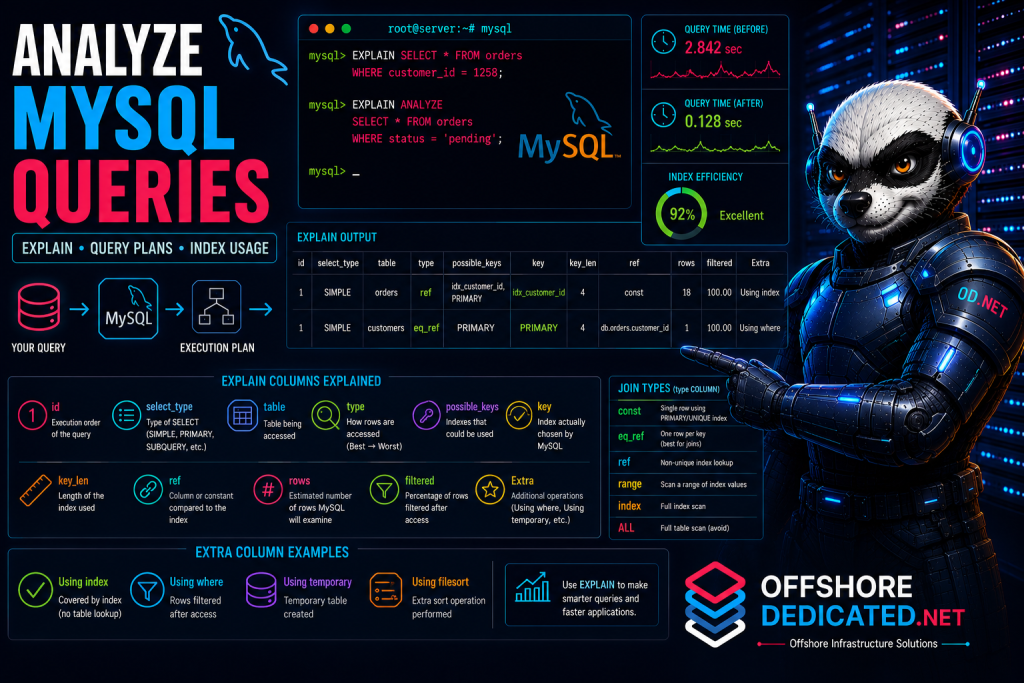
This guide explains how to use EXPLAIN and EXPLAIN ANALYZE, interpret each output column, identify inefficient execution plans, and optimize queries based on real execution data.
What Does EXPLAIN Do in MySQL?
EXPLAIN tells MySQL to display its execution plan instead of running the query normally.
For example:
EXPLAIN
SELECT *
FROM orders
WHERE customer_id = 1258;
Rather than returning rows from the orders table, MySQL shows information such as:
- which table is accessed
- whether an index is used
- estimated rows examined
- join order
- access method
- additional operations such as sorting or temporary tables
Think of EXPLAIN as a roadmap that shows how MySQL plans to reach the requested data.
It is especially useful before creating indexes or changing queries because it allows you to verify whether MySQL will actually use the optimization.
For broader index design, see How to Optimize MySQL Indexes for Faster Queries.
How to Run EXPLAIN on a Query
The simplest syntax is:
EXPLAIN
SELECT *
FROM customers
WHERE email = '[email protected]';
You can also analyze joins:
EXPLAIN
SELECT o.id,
       c.name
FROM orders o
JOIN customers c
ON o.customer_id = c.id;
Or more complex queries containing:
- WHERE
- JOIN
- GROUP BY
- ORDER BY
- LIMIT
- UNION
- subqueries
If a query is slow, always examine its execution plan before modifying indexes or configuration.
Understanding the EXPLAIN Output Columns
Typical output includes:
id
select_type
table
type
possible_keys
key
key_len
ref
rows
filtered
Extra
Each column provides different information about how MySQL intends to execute the query.
id
Shows the execution order.
Simple queries usually have:
1Multiple IDs often indicate:
- subqueries
- derived tables
- UNION operations
select_type
Common values include:
SIMPLE
PRIMARY
SUBQUERY
DERIVED
UNION
SIMPLE means a basic query without subqueries or UNION.
table
Shows the table currently being processed.
Example:
orders
customers
products
For joins, multiple rows appear—one for each table.
possible_keys
Lists indexes that MySQL could potentially use.
Example:
idx_customer_id
PRIMARY
idx_status
If this column is NULL, MySQL found no suitable index candidates.
key
Shows the index MySQL actually selected.
Example:
idx_customer_idIf it displays:
NULLno index is being used.
Remember:
A useful index may exist but still not be chosen if the optimizer believes another execution plan is cheaper.
key_len
Shows how many bytes of the index MySQL actually uses.
A larger value does not necessarily mean better performance.
Instead, it helps determine whether:
- the entire composite index is used
- only part of the index is used
- datatype sizes affect lookup efficiency
ref
Shows which column or constant is compared to the indexed column.
Example:
const
customers.id
This helps explain how rows are matched during query execution.
rows
Estimated number of rows MySQL expects to examine.
Example:
18is generally much better than:
850000Lower estimates usually indicate a more selective execution plan.
Remember that this is an estimate, not the exact number of rows read.
filtered
Represents the estimated percentage of examined rows that satisfy the filtering conditions.
Example:
100.00means MySQL expects nearly every examined row to match.
A lower percentage indicates more filtering occurs after rows are accessed.
Extra
The Extra column often contains the most useful optimization clues.
Common values include:
Using index
Using where
Using temporary
Using filesort
Understanding these values is critical when troubleshooting slow queries.
Understanding MySQL Join Types
The type column describes how MySQL accesses rows.
From best to worst, common values include:
const
eq_ref
ref
range
index
ALL
const
The fastest access method.
Usually occurs when MySQL reads exactly one row using a PRIMARY KEY or UNIQUE index.
eq_ref
Used for efficient joins on unique indexes.
Usually very good performance.
ref
Uses a non-unique index.
Still efficient for most workloads.
range
Reads only part of an index.
Common with:
- BETWEEN
- <
- IN
Often performs well.
index
Scans an entire index.
Usually better than scanning the table itself but may still examine many rows.
ALL
Performs a full table scan.
Example:
type = ALLThis often indicates:
- missing indexes
- unsuitable indexes
- optimizer choosing a scan
- small tables where scanning is cheaper
Large production tables should rarely use ALL unless the workload truly requires it.
How to Identify Full Table Scans
A full table scan usually appears as:
type = ALLCombined with:
key = NULLand
rows = 950000This means MySQL expects to examine nearly every row.
Possible improvements include:
- creating an index
- improving WHERE conditions
- reducing returned columns
- rewriting joins
- reducing unnecessary sorting
Not every full scan is bad.
Very small tables are sometimes faster to scan than to use an index.
The decision depends on table size and workload.
How to Check Which Index MySQL Uses
Suppose this query exists:
SELECT *
FROM orders
WHERE customer_id = 25;
Run:
EXPLAIN
SELECT *
FROM orders
WHERE customer_id = 25;
If key shows:
idx_customer_idthen MySQL is using that index.
If it shows:
NULLthe optimizer chose not to use an index.
Compare this with:
SHOW INDEX
FROM orders;
If the index exists but is unused, investigate why.
See How to Optimize MySQL Indexes for Faster Queries for index design strategies.
Understanding Rows and Filtered Estimates
The optimizer estimates:
- rows examined
- filtering percentage
Example:
rows = 500000
filtered = 5.00
This means MySQL expects to examine approximately 500,000 rows before only 5% remain after filtering.
Large row estimates often indicate opportunities for:
- additional indexes
- composite indexes
- query rewrites
- partitioning
- better filtering
These values are estimates rather than exact runtime statistics.
Understanding the Extra Column
Common values include:
Using index
A covering index supplies all requested data.
Generally very efficient.
Using where
Rows are filtered after access.
Normal for many queries.
Using temporary
A temporary table is created.
May indicate optimization opportunities.
Using filesort
MySQL performs an extra sort operation.
This does not necessarily mean files are written to disk.
Instead, it indicates an additional sorting step.
Often associated with:
- ORDER BY
- GROUP BY
An appropriate index may eliminate unnecessary sorting.
How to Use EXPLAIN ANALYZE
Modern MySQL versions support:
EXPLAIN ANALYZE
SELECT *
FROM orders
WHERE customer_id = 1258;
Unlike ordinary EXPLAIN, this executes the query while reporting actual runtime statistics.
Benefits include:
- actual execution time
- actual rows processed
- timing for each execution step
- comparison with optimizer estimates
This makes EXPLAIN ANALYZE one of the best tools for diagnosing complex slow queries.
Compare Query Plans Before and After an Index
Suppose a query initially shows:
type = ALL
rows = 850000
key = NULL
After creating:
CREATE INDEX idx_customer_id
ON orders(customer_id);
Running EXPLAIN again might show:
type = ref
rows = 18
key = idx_customer_id
This demonstrates the real impact of the new index.
Always compare execution plans before and after optimization rather than assuming changes helped.
Practical MySQL EXPLAIN Examples
Example 1: Missing Index
EXPLAIN
SELECT *
FROM orders
WHERE customer_id = 450;
Output:
type = ALL
key = NULL
rows = 1200000
A full table scan suggests adding an index on customer_id.
Example 2: Composite Index
EXPLAIN
SELECT *
FROM orders
WHERE customer_id = 25
AND status='Paid';
Initially:
Using where
type = ALL
After creating:
CREATE INDEX idx_customer_status
ON orders(customer_id,status);
The optimizer may switch to:
type = ref
key = idx_customer_status
Example 3: ORDER BY Optimization
EXPLAIN
SELECT *
FROM orders
ORDER BY created_at;
Output:
Using filesortAdding an appropriate index on created_at may eliminate the additional sorting step.
Common EXPLAIN Analysis Mistakes
Avoid these mistakes:
- Looking only at
rows - Ignoring the
Extracolumn - Assuming every
ALLis bad - Creating indexes without testing
- Ignoring composite indexes
- Assuming
Using filesortalways means disk access - Optimizing queries without measuring results
- Forgetting to compare plans before and after changes
Practical MySQL Query Analysis Workflow
- Identify a slow query.
- Run:
EXPLAIN
SELECT ...- Review:
- type
- key
- rows
- Extra
- Check existing indexes.
SHOW INDEX
FROM table_name;- Create or modify indexes if appropriate.
- Run
EXPLAINagain. - Compare execution plans.
- Use:
EXPLAIN ANALYZEwhen available.
- Monitor:
- query time
- CPU usage
- disk I/O
- slow query log
When Query Optimization Needs Server Management
Even well-optimized queries cannot compensate for insufficient infrastructure or broader server bottlenecks.
If you continue experiencing:
- slow MySQL queries
- high CPU usage
- high disk I/O
- PHP-FPM worker exhaustion
- MySQL Too Many Connections
- Nginx 502 or 504 errors
- memory pressure
- heavy application workloads
OffshoreDedicated.NET provides:
- Expert Server Management
https://offshorededicated.net/offshore-server-management/ - Offshore Web Hosting
https://offshorededicated.net/offshore-webhosting/ - Offshore VPS Servers
https://offshorededicated.net/offshore-vps-servers/ - Offshore Cloud Servers
https://offshorededicated.net/offshore-cloud-servers/ - Offshore Dedicated Servers
https://offshorededicated.net/offshore-dedicated-servers/ - Offshore Bulgaria Dedicated Servers
https://offshorededicated.net/offshore-bulgaria-dedicated-servers/ - Offshore Streaming Servers
https://offshorededicated.net/offshore-streaming-servers/ - Offshore Bandwidth Commit Servers
https://offshorededicated.net/offshore-bandwidth-commit-servers/
Frequently Asked Questions
What does MySQL EXPLAIN do?
It shows how MySQL plans to execute a query, including index usage, join order, and estimated rows examined.
What is EXPLAIN ANALYZE?
It executes the query and reports actual runtime statistics, making it more accurate than estimates alone.
Is type = ALL always bad?
No. Small tables are often scanned intentionally because it is faster than using an index.
What does Using filesort mean?
It indicates MySQL performs an additional sorting step. It does not necessarily mean data is written to disk.
Should I optimize every query?
Focus first on slow, frequently executed, or resource-intensive queries that have the greatest impact on application performance.
Final Thoughts
EXPLAIN is one of the most valuable tools for understanding MySQL performance. Instead of guessing why a query is slow, it reveals how the optimizer plans to access data, use indexes, and process joins.
By combining EXPLAIN with the slow query log, proper indexing, and ongoing performance monitoring, you can make informed improvements that reduce query time, lower server load, and improve the responsiveness of MySQL-powered applications.