
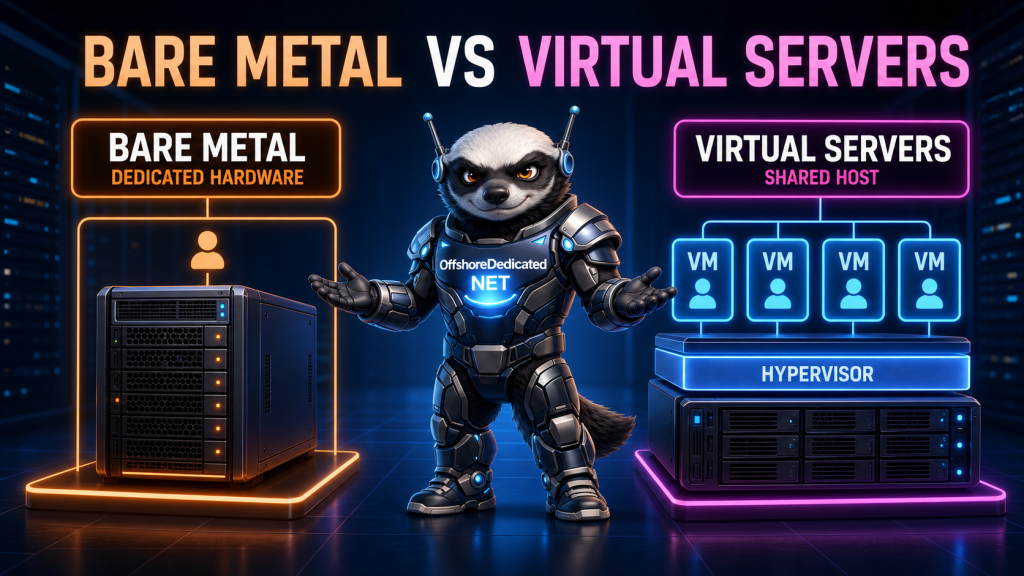
When you rent a server, the word “server” does not always describe the same type of resource.
A bare-metal server gives one customer access to an entire physical machine. A virtual server provides an isolated virtual machine created from the resources of a larger physical host.
Both can run Linux, host websites, operate databases, and provide root access. However, their performance behavior, isolation boundaries, scaling options, and costs are different.
Understanding what you are actually renting makes it easier to choose infrastructure based on your workload rather than marketing terminology.
What Is a Bare-Metal Server?
A bare-metal server is a physical machine allocated to one customer or organization.
The customer receives control of the server’s physical resources, including:
- Processor cores
- System memory
- Storage devices
- Network interfaces
- Hardware controllers
- Available expansion devices
The operating system normally runs directly on the physical hardware. There is no provider-controlled virtualization layer dividing the machine among unrelated customers.
In hosting, the terms bare-metal server and dedicated server are often used interchangeably. Both generally describe a physical server dedicated to one tenant.
This does not necessarily mean that the customer owns the hardware. The provider may still own, house, power, monitor, and replace the machine. The customer is renting exclusive use of it.
What Is a Virtual Server?
A virtual server is a software-defined machine running on a physical host.
A hypervisor separates the host’s CPU, memory, storage, and networking resources into multiple virtual machines. Each virtual machine can have:
- Virtual CPUs
- Allocated memory
- Virtual disks
- Virtual network interfaces
- Its own operating system
- Its own users and applications
A properly virtualized server behaves like an independent computer from the customer’s perspective. The customer can reboot it, install software, configure services, and manage its operating system without controlling the complete physical host.
KVM is a widely used Linux virtualization technology. The official Linux KVM documentation describes the interfaces used to create and control virtual machines, virtual CPUs, and virtual devices.
What Are You Actually Renting?
The clearest difference is the boundary of the allocated resource.
With bare metal, you rent the physical machine.
With a virtual server, you rent an isolated virtual environment running on a physical machine shared with other virtual environments.
The basic structures look like this:
Bare metal:

Physical hardware
└── Customer operating system
    └── Applications
Virtual server:
Physical host
└── Hypervisor
├── Virtual server A
├── Virtual server B
├── Virtual server C
└── Virtual server DThe physical host is still necessary in both cases. Virtualization does not eliminate hardware; it changes how that hardware is allocated and managed.
Bare Metal Does Not Always Mean No Hypervisor
The phrase “bare-metal hypervisor” can make this comparison confusing.
A bare-metal, or Type 1, hypervisor runs directly on physical server hardware and manages multiple virtual machines. Red Hat’s virtualization overview explains how a hypervisor separates physical resources and allocates them to guest virtual machines.
Therefore, a provider may use a bare-metal hypervisor while selling virtual servers.
The phrase describes how the hypervisor is deployed. It does not mean every virtual-server customer receives the complete physical machine.
When buying hosting, ask whether the service gives you:
- Exclusive use of the physical server, or
- A virtual machine on a shared physical host
That distinction is more useful than the hypervisor’s marketing label.
Performance Differences
Bare-metal and virtual servers can both perform well. The important difference is how predictable their access to physical resources is.
CPU Performance
On bare metal, the server’s physical CPU cores are available to one customer’s operating system and workloads.
On a virtual server, the guest sees one or more vCPUs. Those vCPUs are scheduled on the host’s physical processors by the hypervisor.
The host may contain several virtual machines using the same processors. Responsible capacity management can provide excellent performance, but sustained demand from neighboring workloads may create contention if the host is heavily allocated.
Bare metal is usually preferable when consistent CPU performance is more important than flexible allocation.
Examples include:
- Video encoding
- Large build workloads
- Game servers
- Scientific computation
- Continuous data processing
- High-volume compression or encryption
Virtual servers remain appropriate for workloads that do not require continuous access to entire physical CPU cores.
Memory
A bare-metal operating system can use the machine’s installed memory, apart from capacity reserved by firmware or other low-level components.
A virtual server receives an assigned amount of memory from the host. The hypervisor and provider determine how that allocation is enforced.
Both models can provide predictable memory when configured responsibly. Bare metal offers direct visibility into the machine’s physical memory layout and may be preferable for large databases, NUMA-sensitive applications, or workloads requiring hundreds of gigabytes of RAM.
Storage Performance
Bare metal can provide direct control over local drives, RAID configuration, filesystems, caching, and storage queues.
Virtual servers normally use virtual disks backed by the host’s local or networked storage. Multiple virtual machines may share the underlying devices and their available I/O capacity.
Fast NVMe storage can make virtual servers extremely responsive, but the storage architecture and provider’s allocation policy still matter.
Ask about:
- SSD or NVMe technology
- Local versus networked storage
- RAID or replication
- IOPS limits
- Throughput limits
- Snapshot support
- Backup independence
A large advertised disk does not automatically guarantee low latency or high IOPS.
Isolation and Security
Bare metal provides physical tenant isolation because unrelated customers are not running virtual machines on the same server.
This removes cross-tenant resource contention on that machine and eliminates the shared hypervisor as a boundary between those tenants.
A virtual server uses logical isolation. The hypervisor separates its memory, CPU state, virtual storage, and devices from other guests.
Modern hypervisors are designed to provide strong isolation, but the host and hypervisor remain part of the trusted infrastructure. Security therefore depends on:
- Hypervisor updates
- Host operating-system security
- Management-plane protection
- Correct virtual-network configuration
- Storage isolation
- Provider access controls
Bare metal does not make an application automatically secure. An unpatched operating system, weak SSH configuration, exposed database, or vulnerable website remains dangerous regardless of the hardware allocation model.
The Noisy-Neighbor Question
A noisy neighbor is another virtual machine that places heavy demand on a shared resource.
Possible areas of contention include:
- Physical CPU time
- Storage queues
- Network bandwidth
- Host memory
- Cache capacity
Resource controls can limit this interference, but they cannot create physical capacity. A well-managed virtual platform monitors contention and maintains sufficient headroom.
Bare metal removes unrelated tenant workloads from the physical machine. Your own services can still compete with one another, but another customer cannot consume that server’s CPU or local storage bandwidth.
If performance must remain consistent during sustained demand, this difference can justify the higher cost of dedicated hardware.
Provisioning and Scaling
Virtual servers usually have the advantage in provisioning speed.
A provider can create a new virtual machine from an image, assign resources, and start it without physically installing another server. Virtual disks can often be resized, snapshots can be created, and new instances can be deployed quickly.
This makes virtual servers useful for:
- Development environments
- Staging systems
- Temporary projects
- Rapidly growing applications
- Small websites
- Distributed services
- Workloads that need several smaller machines
Bare-metal provisioning may require hardware assignment, storage preparation, network configuration, and operating-system installation. Increasing capacity may mean upgrading components or migrating to another physical server.
Bare metal scales well by adding more servers, but each additional unit is a complete physical machine rather than a small virtual allocation.
Management Responsibility
Both bare-metal and virtual servers may be sold as self-managed or managed services.
The infrastructure type does not decide who is responsible for:
- Operating-system updates
- Firewall configuration
- SSH security
- Web-server maintenance
- Database tuning
- Malware response
- Monitoring
- Backups
A self-managed virtual server can require more customer administration than a fully managed dedicated server.
Before ordering, determine whether the provider manages only the physical infrastructure or also manages the operating system and application stack. OffshoreDedicated.NET offers separate server-management services for customers who need operational assistance.
Cost and Resource Efficiency
Virtual servers have a lower entry cost because one physical machine can support multiple customers.
This model can use hardware efficiently. A small website does not need to pay for an entire processor, a large memory configuration, and several drives that remain mostly idle.
Bare metal costs more because the complete machine is reserved for one customer whether its resources are busy or idle.
However, dedicated hardware can become economically sensible when a workload consistently uses substantial CPU, memory, storage, or bandwidth. At that point, purchasing many large virtual instances may cost more than renting a complete server.
The meaningful comparison is not simply monthly price. Consider:
- Required sustained capacity
- Performance variability
- Scaling frequency
- Operational time
- Migration cost
- Downtime impact
- Backup and recovery requirements
Bare Metal vs Virtual Servers Comparison
| Factor | Bare Metal | Virtual Server |
|---|---|---|
| Physical hardware | Allocated to one customer | Shared through a hypervisor |
| CPU access | Physical processors controlled by one tenant | vCPUs scheduled on host processors |
| Memory | Direct access to installed server RAM | Allocated from host memory |
| Storage | Greater direct hardware control | Virtual disks backed by host storage |
| Tenant isolation | Physical server boundary | Hypervisor-enforced logical boundary |
| Provisioning | Usually slower | Usually faster |
| Small upgrades | May require hardware changes or migration | Often easier to resize |
| Entry cost | Higher | Lower |
| Noisy-neighbor exposure | No unrelated tenants on the machine | Possible on poorly managed hosts |
| Best fit | Sustained or specialized workloads | Flexible, moderate, or distributed workloads |
Actual results still depend on hardware generation, storage design, network capacity, provider operations, and the selected service tier.
Choose Bare Metal When
Bare metal is a strong choice when:
- Performance must remain consistent under sustained load.
- The workload regularly uses large amounts of CPU or RAM.
- Storage latency and queue control are critical.
- You need custom RAID, drives, NICs, or kernel configuration.
- Physical tenant separation is required.
- High and stable network throughput matters.
- You plan to operate your own virtualization platform.
- The workload is predictable enough to use the hardware efficiently.
You can explore available offshore dedicated servers when full physical allocation fits these requirements.
For a more detailed examination of dedicated infrastructure, see Advantages and Disadvantages of Dedicated Servers.
Choose a Virtual Server When
A virtual server is a strong choice when:
- The project needs a low-cost starting point.
- Resources need to be provisioned quickly.
- The workload fits comfortably within a virtual allocation.
- You need several isolated servers rather than one large machine.
- Development and production environments must remain separate.
- Short-term or experimental servers are required.
- Scaling flexibility is more important than direct hardware control.
- You do not need custom physical devices or storage layouts.
OffshoreDedicated.NET’s KVM-based VPS servers provide root-controlled virtual environments for projects that do not require an entire physical machine.
Can You Use Both?
Bare metal and virtual servers are not mutually exclusive.
A business may place a large database on dedicated hardware while running web servers, monitoring systems, development environments, or regional services on virtual machines.
Another option is to rent a bare-metal server and install a hypervisor on it. This gives one organization control over the physical host while allowing it to create multiple internal virtual machines.
A hybrid design can provide physical control where it matters and virtual flexibility everywhere else.
Final Thoughts
Bare metal gives you exclusive use of a physical server. A virtual server gives you an isolated machine created from a shared physical host.
Bare metal usually provides greater performance consistency, physical tenant isolation, and hardware control. Virtual servers generally provide faster deployment, easier incremental scaling, and a lower entry cost.
Neither model is automatically better. The correct choice depends on how steadily the workload consumes resources, how much variability it can tolerate, how quickly it must scale, and how much infrastructure you want to manage.
Choose the smallest architecture that meets the workload’s real requirements while leaving a practical path for growth.