
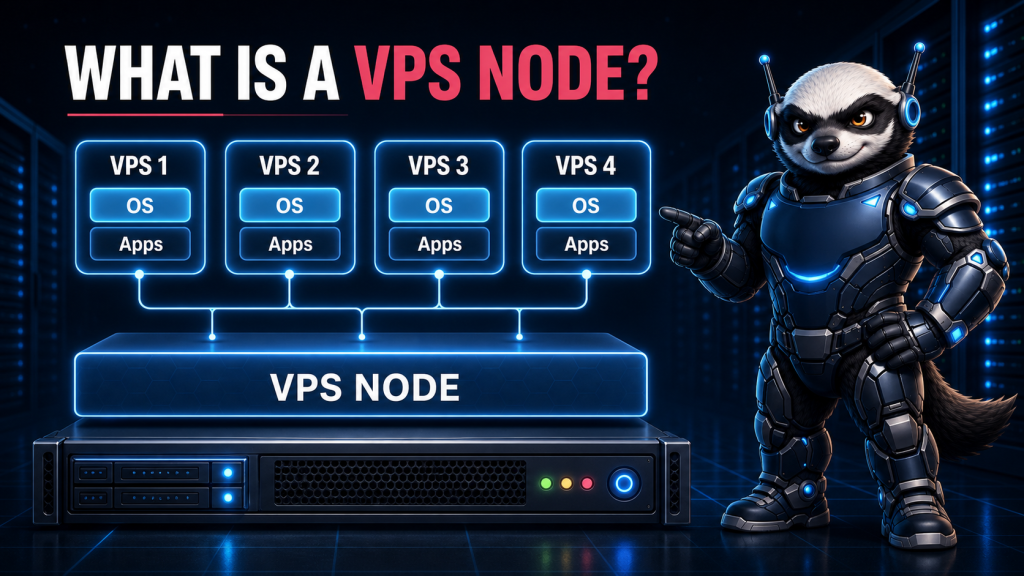
A virtual private server may look and behave like an independent machine, but it normally operates alongside other virtual servers on a larger physical system. That physical system is commonly called a VPS node, host node, or simply a host.
The node supplies the processors, memory, storage, and network connectivity used by its virtual servers. A virtualization layer divides these physical resources into separate environments, allowing every VPS to run its own operating system and applications.
Understanding the VPS node helps explain why two VPS plans with similar specifications can deliver noticeably different performance.
What Is a VPS Node?
A VPS node is a physical server configured to host multiple virtual private servers.
The node contains real server hardware, including:
- Physical CPU cores
- System memory
- SSD or NVMe storage
- Network interfaces
- Storage and network controllers
- Power supplies and cooling components
Virtualization software installed on the node creates and manages the individual virtual servers. Each VPS receives an allocation of virtual CPUs, memory, storage, and network capacity.
Customers normally interact only with their VPS. The hosting provider is responsible for operating the underlying node, maintaining its hardware, and controlling how its resources are divided.
If you use an offshore VPS server, your operating system runs inside one of these isolated virtual environments rather than directly on the complete physical machine.
How Does a VPS Node Work?
A VPS node adds a virtualization layer between its physical hardware and the virtual servers running on it.
On a KVM-based node, Linux and KVM provide the foundation for creating virtual machines. Each virtual machine can have virtual processors, memory, storage devices, and network interfaces. The official Linux KVM documentation describes the kernel interfaces used to create and control virtual machines, virtual CPUs, and virtual devices.
The simplified structure looks like this:
Physical server hardware → Host operating system and hypervisor → Individual virtual servers
The hosting provider uses a management platform to create, start, stop, monitor, resize, and remove virtual servers. Customers may receive a separate control panel for tasks such as restarting their VPS or reinstalling its operating system.
The Physical Hardware
At the bottom of the system is the physical server.
Its hardware determines the total amount of capacity that can be distributed. For example, a node may have multiple server-grade processors, hundreds of gigabytes of RAM, several NVMe drives, and one or more high-speed network connections.
A node with modern processors and fast storage can generally support more demanding workloads than one built from older hardware. However, hardware specifications alone do not determine performance. Resource allocation and the number of competing workloads are equally important.
The Hypervisor
The hypervisor is the virtualization technology that creates and manages the virtual machines.
KVM, or Kernel-based Virtual Machine, is widely used for Linux VPS hosting. It uses hardware-assisted virtualization features provided by modern processors and allows each virtual machine to run its own kernel.
This gives a KVM VPS stronger separation than a container-based environment in which multiple instances share the host’s kernel.
The hypervisor also maps virtual resources to physical resources. When a VPS uses a virtual CPU, for example, the requested work must ultimately be processed by one of the node’s physical CPU cores.
The Virtual Machines
Each virtual machine is presented with its own virtual hardware.
From inside the VPS, the operating system sees virtual CPUs, RAM, disks, and network interfaces. The VPS administrator can install packages, create users, configure services, and reboot the operating system without directly controlling the physical node.
This separation makes VPS hosting flexible. One node can run several virtual servers with different operating systems, configurations, and purposes.
Which VPS Resources Are Shared?
Virtualization provides isolation, but a VPS still depends on shared physical infrastructure.
Understanding which resources are shared helps explain possible performance differences.
CPU Time
A VPS plan normally includes a particular number of virtual CPUs, often written as vCPUs.
A vCPU is not necessarily a physical processor core reserved exclusively for one customer. Multiple virtual machines may receive processing time from the same physical cores. The hypervisor schedules their workloads according to the configuration set by the provider.
Sharing CPU capacity is normal. Problems arise when too many CPU-intensive virtual machines compete for insufficient physical processing time.
Physical Memory
RAM is allocated to individual virtual machines by the host.
Memory allocation is usually more predictable than shared CPU time because a VM requires its assigned memory to remain available while it is running. Providers must therefore leave enough capacity for the host system and every active guest.
Heavy memory overcommitment can create pressure on the node and may lead to swapping or reduced performance.
Storage
Several virtual servers may store their virtual disks on the same SSD or NVMe array.
This means storage capacity is not the only consideration. The virtual machines may also share:
- Input/output operations per second
- Storage bandwidth
- Controller capacity
- Write latency
- Disk cache
A VPS with plenty of available disk space can still feel slow if the underlying storage is saturated by other workloads.
Network Capacity
The node’s network ports and upstream connection carry traffic for all the virtual servers it hosts.
Providers may apply speed limits or bandwidth policies to individual VPS instances. Without sensible controls, one high-traffic workload could consume a disproportionate amount of the node’s available network capacity.
Customers running bandwidth-intensive applications should examine port speed, traffic allowance, and whether bandwidth is metered or unmetered—not only the advertised VPS storage and RAM.
What Is VPS Overselling?
Overselling means allocating more virtual capacity than the node could provide if every customer used the maximum amount simultaneously.
Some level of shared allocation can be reasonable. Most virtual servers do not run their CPUs at full utilization every second, so providers can use otherwise idle capacity efficiently.
The problem is aggressive overselling.
If too many busy virtual machines are placed on the same node, customers may experience:
- Unpredictable CPU performance
- Increased disk latency
- Slow application response times
- Network congestion
- Performance that changes according to the time of day
A low VPS price does not automatically prove that a node is overloaded. Likewise, a high price does not guarantee careful capacity management. Real performance depends on the hardware, allocation policy, monitoring, workload mix, and operational practices of the provider.
What Is the Noisy Neighbor Problem?
A noisy neighbor is another virtual server whose workload places unusually heavy pressure on a shared node resource.
For example, another VPS could generate sustained CPU load, perform large numbers of random disk writes, or send significant network traffic. If the node lacks effective resource controls, that activity may affect other customers.
Modern virtualization platforms can limit CPU time, disk throughput, memory, and network usage. These controls reduce interference, but they cannot create physical capacity that does not exist.
Good node management therefore combines resource limits with monitoring and sufficient unused capacity.
Administrators should also investigate their own VPS before assuming that every slowdown is caused by a neighbor. Inefficient database queries, memory exhaustion, application errors, traffic spikes, and compromised software can produce similar symptoms.
What Happens If a VPS Node Fails?
A VPS is isolated logically, but it still depends on the physical node.
If the node experiences a hardware failure, power problem, kernel crash, or storage fault, several virtual servers may become unavailable at the same time. The node is therefore a shared failure domain.
Providers can reduce this risk through:
- Redundant power supplies
- RAID or resilient storage
- Hardware monitoring
- Spare components
- Tested backups
- Replication
- Clustering or high-availability systems
- The ability to migrate or restore virtual machines elsewhere
However, a VPS should not automatically be considered highly available simply because it is virtualized. High availability requires additional infrastructure and operational planning.
Customers should maintain independent backups even when the provider offers snapshots or node-level protection. A snapshot can be useful for rollback, but it should not be the only copy of important data.
VPS Node vs Dedicated Server
A VPS node hosts multiple customer environments, while a dedicated server normally assigns the physical machine to one customer.
With a VPS, the customer receives a virtual allocation from the node. This generally lowers the entry cost and makes upgrades or reinstallation easier.
With a dedicated server, the customer gains direct access to the machine’s physical CPU, memory, storage, and network interfaces. There are no unrelated customer virtual machines competing for the same node resources.
A VPS is often suitable for:
- Development and testing
- Small and medium websites
- VPN services
- Application hosting
- Staging environments
- Projects requiring root access at a moderate cost
A dedicated server may be more appropriate for consistently heavy CPU workloads, large databases, high storage throughput, substantial network traffic, or applications requiring predictable physical resources.
The correct choice depends on workload behavior rather than website size alone. OffshoreDedicated.NET provides both virtual private servers and offshore dedicated servers for projects with different resource and isolation requirements.
What Should You Ask about a VPS Node?
Customers will not always receive every internal node detail, but several questions can help evaluate a VPS service:
- Which virtualization technology is used?
- Are the virtual servers based on KVM or a container platform?
- What type of storage does the node use?
- Are storage performance limits defined?
- How are CPU and network usage controlled?
- Are node resources actively monitored?
- Does the provider maintain backups or snapshots?
- What happens when the physical node fails?
- Can the VPS be resized or migrated?
- Is the VPS self-managed or does the provider offer server management?
The answers provide more useful context than a simple list of vCPUs, RAM, and disk capacity.
Final Thoughts
A VPS node is the physical server that supplies resources to multiple virtual private servers. The hypervisor separates those virtual machines, but their CPU time, storage performance, and network traffic still depend on the node’s physical capacity and the provider’s allocation policies.
This is why the quality of a VPS cannot be judged from its advertised RAM and storage alone. Modern hardware, sensible resource limits, reliable storage, network capacity, monitoring, and responsible node management all affect the result.
A well-managed VPS node provides a useful balance between cost, control, and isolation. When a workload outgrows that shared model or requires more predictable physical resources, moving to a dedicated server becomes the natural next step.