
[t
Backups are not a feature. They are an architecture.
In serious hosting environments — whether Shared Hosting, VPS, Cloud Servers, Dedicated, or Streaming Dedicated servers — backups must be designed intentionally. A checkbox labeled “Enable Backup” is not a strategy.
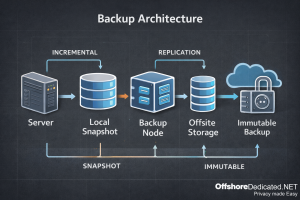
This guide explains how modern backup architectures are designed in real infrastructure environments, including incremental models, snapshot layers, immutability, and recovery verification.
1. Start With Recovery Goals: RPO & RTO
Before choosing tools, operators define two metrics:
RPO (Recovery Point Objective)
How much data loss is acceptable? (5 minutes? 1 hour? 24 hours?)
RTO (Recovery Time Objective)
How quickly must services be restored?
A personal blog may tolerate hours of downtime.
A streaming infrastructure or high-traffic production environment cannot.
Backup architecture must be aligned with workload sensitivity — not convenience.
2. The Modern Baseline: 3‑2‑1‑1‑0 Model
Modern infrastructure increasingly follows the 3‑2‑1‑1‑0 principle:
• 3 copies of data
• 2 different storage media
• 1 offsite copy
• 1 immutable (air‑gapped or write‑locked) copy
• 0 restore errors (verified backups)
This model exists because ransomware and misconfiguration incidents often target backup repositories first.
Offsite alone is not sufficient anymore.
3. Backup Layers in Hosting Environments
In hosting infrastructure, backups operate across three layers:
A) System Layer
- OS configuration
- Service configs (Apache, NGINX, MySQL, systemd)
- Control panel settings
System-level backups protect infrastructure rebuild capability.
B) Account / Application Layer
- Website files
- Email accounts
- cPanel/WHM account data
- User home directories
This layer enables account-level restores.
C) Database Layer
- MySQL / MariaDB dumps
- Consistent transactional snapshots
- Binary logs (for point-in-time recovery)
Databases require consistency-aware backups. A file copy alone is not enough.
For deeper database troubleshooting reference, see:
Fixing Common MySQL Server Problems in Hosting Environments
4. Backup Methods Explained
4.1 Full Backups
Complete copy of all selected data.
Pros:
- Simple restoration
- Independent recovery points
Cons:
- Large storage requirement
- Slower backup windows
4.2 Incremental Backups
Only changed data since the last backup is stored.
Pros:
- Storage efficient
- Faster daily runs
Cons:
- Restore chain dependency
- More complex recovery process
Modern systems often use “incremental forever” models with deduplication.
4.3 Snapshot Backups
Common in VPS, Cloud, and virtualization environments.
Snapshots capture filesystem or volume state at a moment in time.
Important distinction: Snapshots are not offsite backups. They protect against accidental changes — not hardware failure or provider-level loss.
4.4 Image-Level vs File-Level Backups
Image-level:
- Full server image
- Fast disaster recovery
- Infrastructure cloning
File-level:
- Granular restore
- Account-level recovery
- Lower storage footprint
Serious environments combine both.
5. Offsite & Immutable Storage
Offsite Backup
Stored in a geographically separate location. Protects against:
- Hardware failure
- Data center incident
- Regional outage
Immutable Backup
Write-once storage model. Cannot be modified or deleted during retention window.
This protects against:
- Ransomware encryption
- Compromised admin accounts
- Insider mistakes
Privacy-focused infrastructures must treat immutable backups as non-negotiable.
6. Hosting Environment Differences
Shared Hosting
- Account-level incremental backups
- Centralized storage
- Lower RPO expectations
VPS & Cloud Servers
- Snapshot layer + file-level offsite
- Resource-aware scheduling
- Swap/disk I/O consideration
Dedicated Servers
- Image-level backups recommended
- Separate backup storage server
- Hardware rebuild planning
Streaming Dedicated Servers
- Large storage footprint
- Media-heavy incremental strategy
- Bandwidth-aware offsite replication
Infrastructure type determines backup topology.
To understand server architecture differences, see:
Comparing Hosting Control Panels: Architecture, Security & Operational Tradeoffs
7. Verification: The Forgotten Step
A backup that has never been restored is unverified data.
Best practice includes:
- Scheduled restore tests
- Hash verification
- Periodic recovery drills
- Restore-time measurement
This fulfills the “0 errors” principle in 3‑2‑1‑1‑0.
8. Common Backup Misconceptions
• “Snapshots are enough.”
• “My hosting provider handles everything.”
• “Daily backups mean I’m safe.”
• “If it’s in WHM, it’s protected.”
Control panels simplify backup configuration — but architecture decisions remain critical.
9. Operational Checklist (Bookmark Section)
Before trusting a backup strategy, verify:
Is there an offsite copy?
Is there an immutable copy?
Are backups encrypted?
Are restore tests performed?
Are RPO/RTO targets defined?
Is database consistency handled properly?
Is backup storage isolated from production credentials?
If any answer is “no,” the architecture is incomplete.
Conclusion
Backup architecture is not about storing data. It is about guaranteeing recovery.
In serious hosting environments, backups must be layered, verified, offsite, and resistant to compromise.
Whether operating Shared Hosting, VPS, Cloud Servers, Dedicated infrastructure, or Streaming platforms — recovery capability defines reliability.
Backup strategy should be treated as infrastructure design — not a panel setting.